
Your iPhone slipped into water, got caught in the rain, or took an unexpected dive. Now you’re left wondering if there’s internal damage you can’t see. Recognising iPhone water damage symptoms early helps you determine whether your device needs professional attention or managed to escape unscathed.
Water damage doesn’t always reveal itself immediately. Some signs appear right away, a glitchy screen or muffled speakers, while others develop over days as corrosion builds inside the device. Knowing exactly what to look for can prevent costly surprises and help you act before minor issues become major failures.
This guide walks you through the physical signs, performance issues, and the Liquid Contact Indicator (LCI) check that confirms water exposure. If you spot damage, fyxters connects you with vetted local technicians for fast, transparent repairs backed by a service guarantee.
Why iPhone water damage symptoms can appear later
Water exposure doesn’t always cause immediate failure. Your iPhone might work perfectly fine for hours or even days after getting wet, giving you a false sense of security. This delay happens because moisture needs time to trigger corrosion and short circuits inside the device’s delicate components.
The corrosion timeline
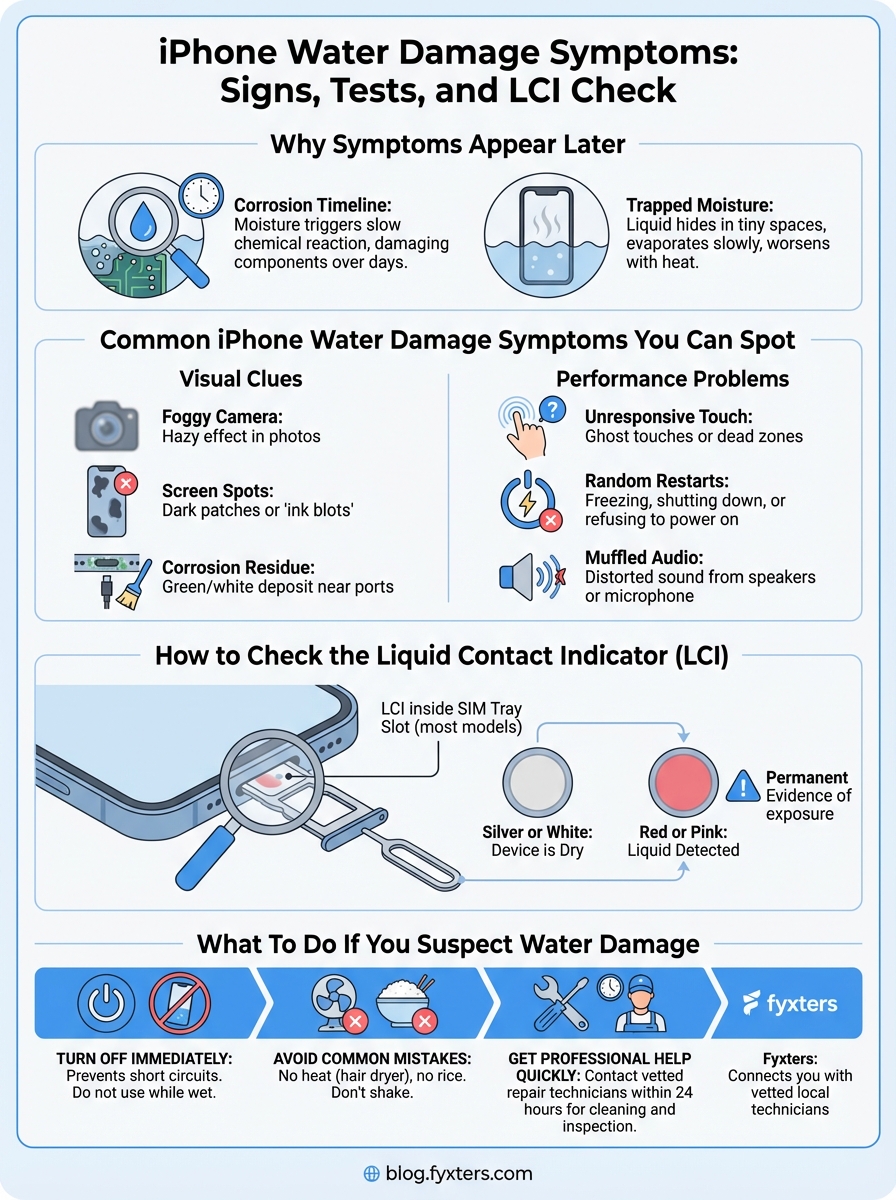
Liquid creates a slow chemical reaction once it reaches your iPhone’s internal circuitry. Salt, minerals, and contaminants in the water accelerate this process, eating away at solder joints, connectors, and chips. You might notice subtle glitches at first, a flickering display or unresponsive buttons, that gradually worsen as corrosion spreads across the logic board.
The damage can take several days to manifest because the water itself doesn’t always cause immediate shorts. Instead, the minerals left behind form conductive pathways that disrupt normal electrical flow. Even if you dry the exterior thoroughly, trapped moisture continues working its way through internal components where you can’t reach it.
Water damage symptoms often worsen over time as corrosion spreads, making early detection critical.
Moisture trapped inside
Your iPhone contains dozens of tiny spaces where water can hide after exposure. Liquid seeps behind the screen, into the speaker grills, around the camera lenses, and beneath protective shields covering the logic board. These pockets of moisture evaporate slowly, sometimes taking several days to fully dry under normal conditions.
Temperature changes make this worse. When you use your iPhone, it generates heat that turns trapped water into steam, spreading it to new areas inside the case. This explains why iphone water damage symptoms can appear or intensify after charging your device or running processor-intensive apps that raise internal temperatures significantly.
Common iPhone water damage symptoms you can spot
Your iPhone displays several telltale signs when water has infiltrated its internal components. Recognising these iphone water damage symptoms early gives you the best chance to prevent permanent damage through professional intervention. Some indicators appear immediately, while others surface gradually as moisture spreads.
Visual clues you can see
Water leaves visible traces on your iPhone’s exterior and screen. You might notice condensation or fog trapped beneath the camera lens, creating a hazy or blurred effect in photos. Discolouration or water stains can appear along the edges of the display, particularly near the speaker grills or charging port where liquid typically enters.
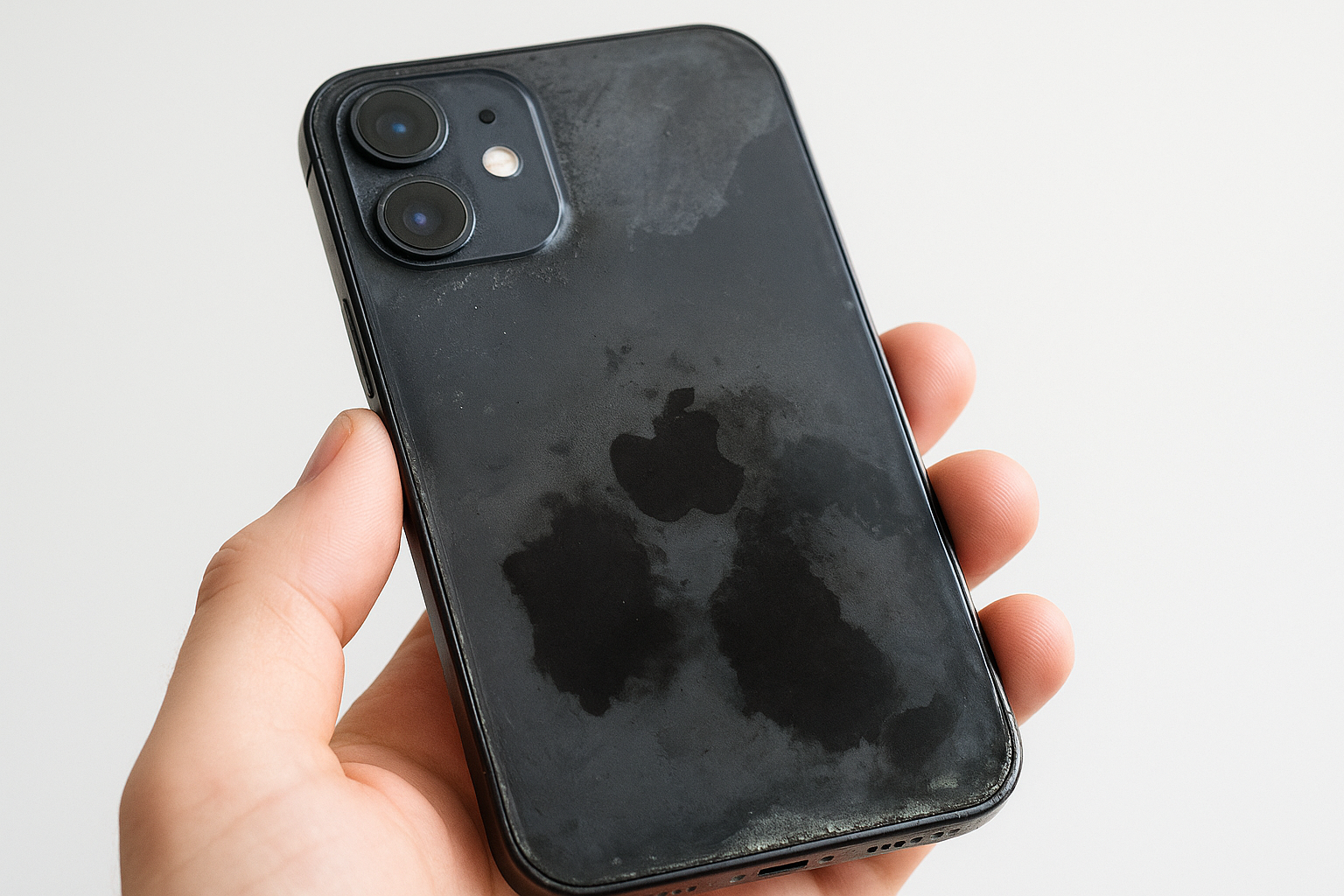
The screen itself may develop dark spots or patches that look like ink blots spreading across the display. These dead pixels or LCD bleed patterns indicate moisture has reached the display assembly, potentially damaging the delicate layers that produce images. Corrosion around metal parts, especially near ports and buttons, shows as green or white residue that wasn’t there before.
Performance problems that signal damage
Functional issues often reveal hidden water damage before you spot any physical signs. Your touchscreen might become unresponsive in certain areas or register ghost touches without you pressing anything. The device could randomly restart, freeze during normal use, or refuse to power on despite having battery charge remaining.
Performance glitches like unresponsive buttons or erratic behaviour often indicate moisture affecting internal circuitry.
Audio problems provide strong evidence of water exposure. Muffled sound from speakers, distorted microphone output during calls, or complete audio failure all suggest liquid has reached these sensitive components.
How to test your iPhone after it gets wet
Testing your iPhone systematically after water exposure helps you identify problems before they escalate. You need to check both basic functions and deeper performance indicators to catch hidden damage that might not show up immediately. These tests reveal whether moisture has affected critical components.
Basic functionality checks
Start with simple operations that engage different systems inside your iPhone. Press the power button to wake the screen, then test the volume buttons and home button (if your model has one). Swipe across the entire touchscreen surface to verify every area responds correctly without dead zones or phantom touches.
Connect your charging cable to check if the port registers the connection properly. Play a video or music track to test both speakers and verify audio output sounds clear rather than muffled. Make a test call using speakerphone and regular modes to ensure the microphone and earpiece function normally without distortion.
Systematic testing of all basic functions reveals which components may have suffered water damage.
Camera and sensor tests
Open your camera app and take several photos in different lighting conditions. Check for fog, blur, or unusual spots that indicate moisture behind the lens. Test both front and rear cameras along with the flash to ensure optical components remain unaffected by water exposure.
Verify that Face ID or Touch ID works consistently without requiring multiple attempts. These biometric sensors are particularly sensitive to moisture damage and often fail when iphone water damage symptoms develop beneath the surface.
How to check the liquid contact indicator LCI
Your iPhone contains a built-in water detection system called the Liquid Contact Indicator (LCI) that confirms whether your device has been exposed to liquid. This small indicator changes colour permanently when it contacts water, giving you definitive proof of moisture exposure even when iphone water damage symptoms haven’t appeared yet. Apple technicians check this indicator before accepting warranty claims.
Where to find the LCI
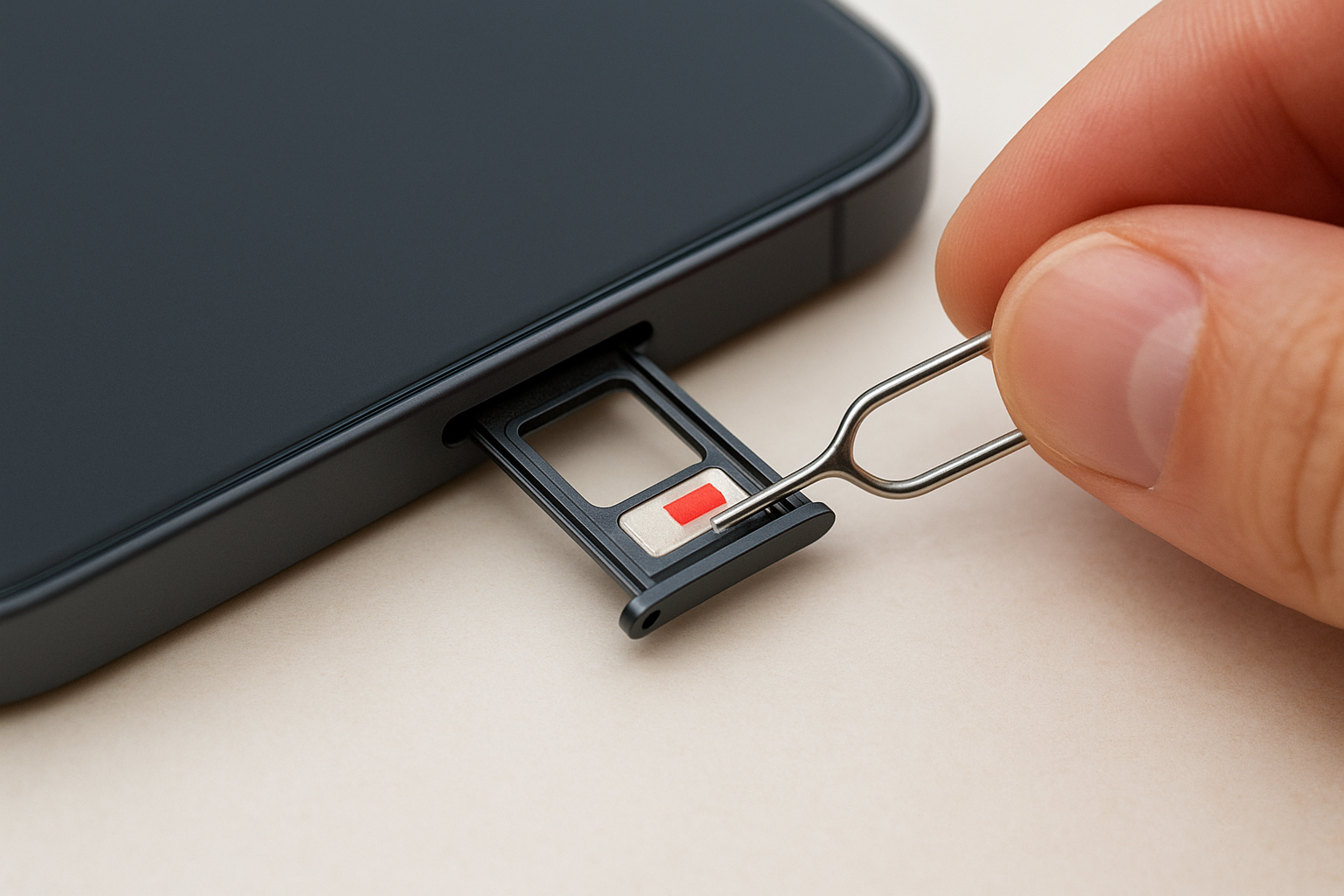
The LCI sits inside your SIM card tray slot on most recent iPhone models. Remove the SIM tray using the eject tool or a paperclip, then shine a bright light directly into the empty slot. You need to angle your view carefully because the indicator measures only a few millimetres across and sits deep inside the opening.
Different iPhone generations place the LCI in various locations. Older models feature multiple indicators inside the headphone jack, charging port, or beneath removable battery compartments. Check Apple’s official support documentation for your specific model to locate all indicator positions accurately.
The LCI provides instant confirmation of water exposure, even before visible symptoms develop.
What the colours mean
A silver or white indicator tells you the device hasn’t contacted liquid. This original colour confirms your iPhone remains dry inside despite any external moisture it may have encountered. The indicator stays this colour under normal humidity conditions.
Red or pink colouration proves liquid has entered your iPhone and triggered the indicator permanently. This colour change remains visible indefinitely, providing lasting evidence of water exposure that doesn’t fade over time.
What to do if you suspect iPhone water damage
Taking immediate action when you notice iphone water damage symptoms prevents further corrosion and increases your chances of saving the device. The steps you take in the first few hours determine whether your iPhone survives water exposure or suffers permanent failure. Acting quickly makes the difference between a simple repair and complete data loss.
Turn off your device immediately
Power down your iPhone the moment you suspect water damage, even if it appears to work normally. Electricity flowing through wet circuits accelerates corrosion and creates short circuits that destroy components instantly. Hold the power button and volume down button simultaneously until the shutdown slider appears, then swipe to turn off completely.
Keeping your iPhone powered on while wet dramatically increases the risk of permanent damage.
Avoid common drying mistakes
Resist the urge to use heat sources like hair dryers or ovens, which can melt internal adhesives and warp delicate components. Skip the rice trick entirely because grains create dust that clogs ports and speakers. Never shake or blow into openings, as this pushes moisture deeper into areas you can’t reach.
Get professional help quickly
Contact a vetted repair technician within 24 hours of water exposure for proper cleaning and inspection. Fyxters connects you with local specialists who use ultrasonic cleaning and diagnostic tools to remove corrosion before it spreads.
Key takeaways and next steps
Recognising iphone water damage symptoms early gives you the best chance to save your device and prevent permanent component failure. Check your Liquid Contact Indicator immediately after water exposure to confirm whether moisture entered the case. Watch for delayed symptoms like screen discolouration, muffled audio, or erratic touchscreen behaviour that can develop days after the incident.
Power down your iPhone the moment you suspect damage and avoid common mistakes like using heat or rice. Professional cleaning within 24 hours removes corrosive residue before it destroys your logic board. Don’t wait for symptoms to worsen or assume your device escaped damage just because it powers on normally.
Fyxters connects you with vetted local technicians who provide transparent pricing and fast repair appointments backed by service guarantees. Visit our blog for more iPhone repair guides and book your repair today if you’ve spotted any warning signs.